

Loan Payments
Options for Loan Payments
One-Time Loan Payments:
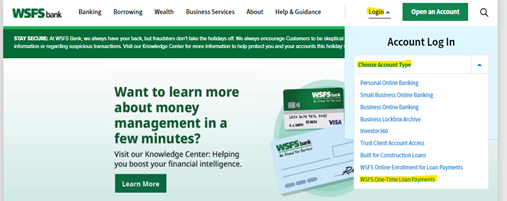
- On wsfsbank.com, click on the Login dropdown. Go to the Choose Account Type dropdown and select WSFS One‑Time Loan Payments.
- Enter your Account Number and Note Number, and click Continue.
- Enter the Zip Code associated with the account and click continue.
- Your business name and address will auto-populate. Enter a Contact Name, Phone Number, and Email Address. Please note: the email address entered here is where the payment confirmation email will be sent.
- The Payment Amount will automatically populate based on your monthly payment. If the payment is meant to go towards Principal only, please enter the amount, otherwise the regular payment will be processed.
- Fill in all fields and change the No button to Yes for the payment to go through, then select Continue.
ACH/Autopay:
To set up pre-authorized loan payments via ACH please download and complete this form, then email it to your Relationship Manager along with a voided check.